
brenu
Jul 17, 2026
i know
// NEWS
STRAIGHT FROM THE DISCORD ANNOUNCE CHANNEL
brenu
Jul 17, 2026
i know

⸝⸝ ⟡
Jul 17, 2026
im male btw
⸝⸝ ⟡
Jul 17, 2026
mwah.

bartusek
Jul 17, 2026
<:mrbeanconfused:1526452841907097701>
brenu
Jul 17, 2026 · edited
<@1521916288505479242> tysm your hottie
bartusek
Jul 17, 2026
He also made this software
brenu
Jul 17, 2026
yeahhhhhhhh

bartusek_077
Jul 17, 2026
Also thanks to <@1521916288505479242>
brenu
Jul 17, 2026
<@&1518604777477378228>

VeloBot
Jul 17, 2026
QWERTY velocity — when you play Free play on your computer keyboard, the notes now respond to how you play: faster passages get louder, easing off gets softer, instead of every note being the same flat hit. It drives the visualizer's note glow too.
Fully tunable in Settings → Playing → QWERTY velocity: gain per key, decay, and the soft-to-loud range. Off by default — flip it on and computer-keyboard playing stops feeling dry. (A real MIDI keyboard already sends its own velocity; this is for QWERTY players.)
Big thanks to bartusek and roel for their help shaping the visualizer's customization in Velo 2.1 — the effects, colors and scenes are better because of you. 🙌
Velo reads your keyboard on purpose — that's how it plays. Antivirus can mistake that for a keylogger. Velo never records or sends your keystrokes — it only checks for updates. It's also unsigned (a code-signing cert costs money and Velo is free). → More info → Run anyway.
Updating from an older version keeps your library and settings.
VeloBot
Jul 17, 2026
The falling-notes view is now a fully customizable light show. Ten scene wallpapers behind the notes, real effects (glow, particles, shockwaves, streaklets, chord-reactive bloom), a rainbow mode where notes cycle color forever (with adjustable spin speed), your own note & saber colors, adjustable darken / blur / vignette, and an auto-hiding gear with one-click presets — Clean · Velo · Cinema · Overdrive · Light. It stays smooth at 60fps and now drives Practice → Free play and Rhythm, not just Stage.
Velo reads your keyboard on purpose — that's how it turns typing into notes and plays into game pianos. That's technically the same trick a keylogger uses, so antivirus warns. Velo never records or sends your keystrokes — it only ever phones home to check for updates. It's also unsigned (a code-signing certificate costs money and Velo is free), so Windows shows an "unknown publisher" warning. → More info → Run anyway.
From 2.1 on, Velo's code is closed. It's still free — just download and run. (Older GPL versions stay GPL.)
Updating from an older version keeps your library and settings — backing up Documents\Velo once never hurts.
bartusek_077
Jul 16, 2026
LETS GO SPAIN!!!!!!!
bartusek_077
Jul 16, 2026
brenu
Jul 16, 2026
I'm just kidding hahha. GO SPAIN!
brenu
Jul 16, 2026
Velo does not accept Argentines on the server. Get out!
bartusek_077
Jul 16, 2026
@everyone
bartusek
Jul 16, 2026
brenu
Jul 16, 2026
<@&1518604777477378228>
VeloBot
Jul 16, 2026
If you unzipped Velo inside Documents\Velo, the old updater replaces the app files and can wipe your Midis folder and settings. Copy Documents\Velo somewhere safe before you click "Update and Restart".
Good news: from 2.0 on this never happens again — the updater now preserves your Midis, Backgrounds, Compositions and config, and auto-backs them up when it detects that kind of install.
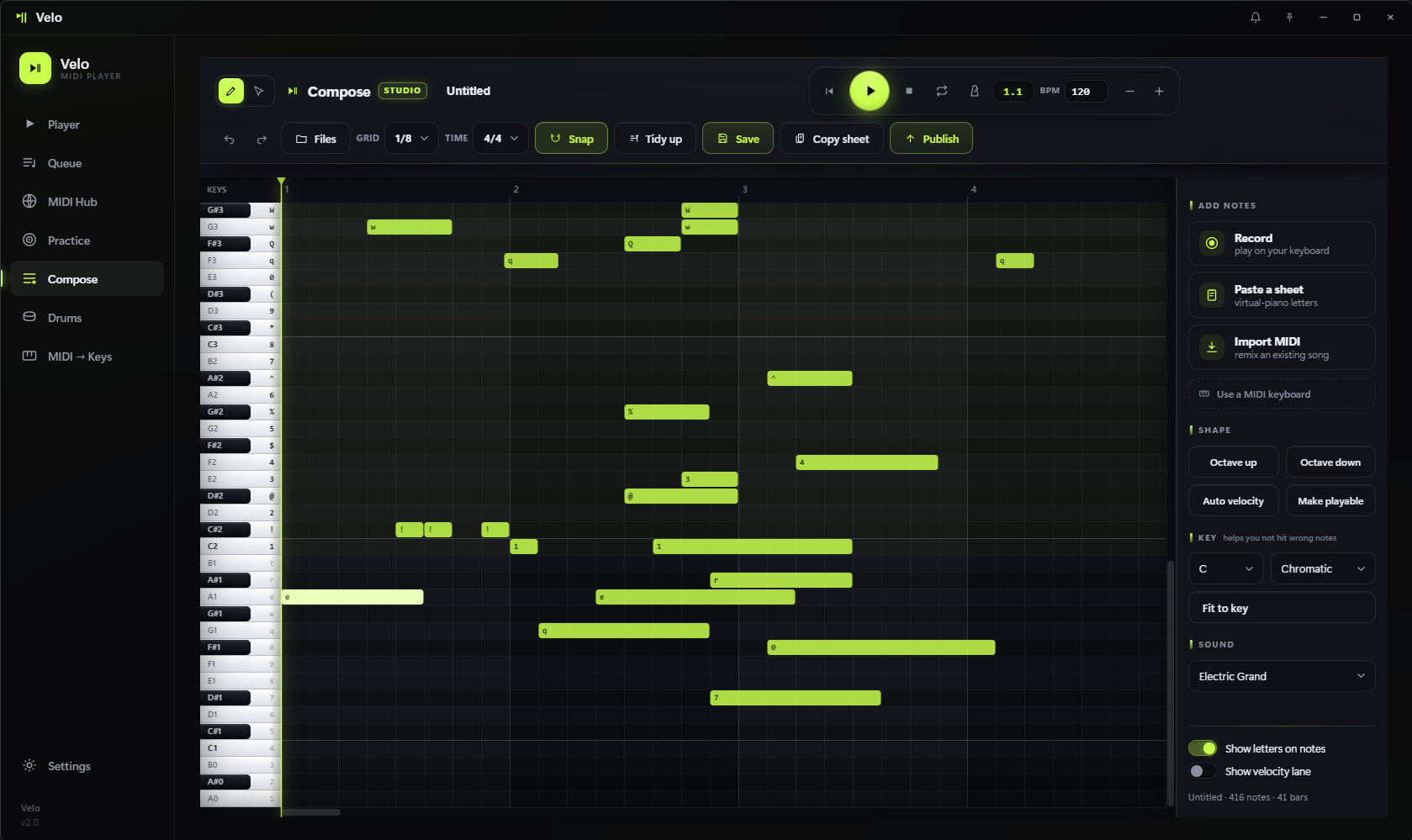
The biggest update yet. Velo isn't just a player anymore — it's a full MIDI studio.
✨ Compose — a built-in piano-roll editor:
.mid or a sheet, or Publish straight to velomidi.com.🎹 One keyboard, everywhere — a unified MIDI-input layer, so your MIDI keyboard works the same in Practice, MIDI→Keys and Compose. Windows and Linux.
↔️ Expandable mini-player — drag the pill's edge to widen it so long song names fit.
🐧 Linux support + lots of fixes and polish throughout.
Velo-win.zip below, unzip, run Velo.exe. (Back up Documents\Velo first — see the top.)./install-linux.sh.bartusek
Jul 14, 2026
THANKS <@1023629361833836615>